
The Patient Import feature allows Organisations to bulk upload Patients into the platform using a CSV file 📥
With recent enhancements, you can now include Custom Fields 🧩 in your import, as well as use a Download Template 📄 to streamline file preparation and reduce errors.
What’s New ✨
🧩 Custom Field Support
You can now include your Organisation’s configured Custom Fields as columns in the Patient import file.
This allows you to bulk populate additional data such as:
- Internal IDs
- Referral Sources
- Risk Categories
- Program Allocations
- Funding Types
- Any other Organisation-specific data points
🔗 Automatic Mapping
The system will automatically map Custom Fields during import if the column header matches the Custom Field name exactly.
This removes the need for manual mapping and speeds up the import process ⚡
📥 Download Template
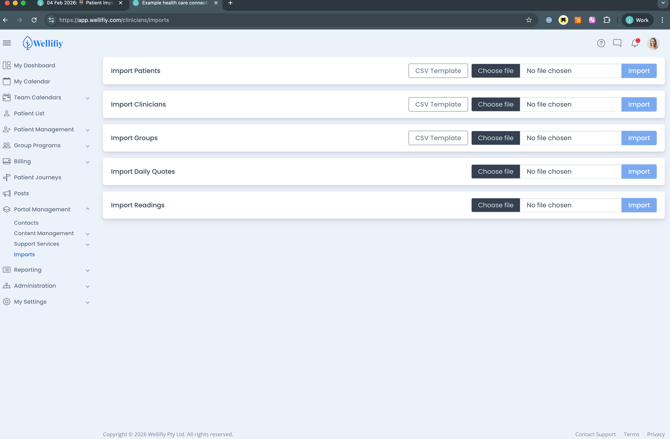
A Download Template button is now available in the Imports screen.
This template:
- Includes all required system fields ✅
- Provides the correct column structure 📊
- Allows you to easily add Custom Field columns 🧩
- Reduces formatting issues and import errors 🚫
How to Import Patients 🧑🤝🧑
1️⃣ Download the Template
- Navigate to Portal Management → Imports
- Click CSV Template under Import Patients
2️⃣ Prepare Your File 📝
Open the CSV file and populate the required fields.
Common fields include:
- MRN
- Name
- Surname
- Date of Birth
- Mobile Phone
- Must include the country code and start with + i.e. +44xxxxxxxxxx -
- Ensure this column is saved as a Text type
- Admission Date
- Send Invite (e.g. yes / no)
- Group
You can also add additional columns for any Custom Fields configured in your Organisation 🧩
3️⃣ Upload the File 🚀
- Return to the Imports screen
- Click Choose file under Import Patients
- Select your completed CSV file
- Click Import
Tips & Best Practices 💡
🎯 Match Column Names Exactly
Custom Fields will only map automatically if the column name matches the field name exactly.
🔤 Use Standardised Values
For fields like Send Invite, use consistent values such as:
yes/notrue/falsey/n
🔍 Validate Before Upload
- Ensure there are no empty required fields
- Check date formats are consistent
- Remove any extra columns not needed
How This Helps 🚀
⚡ Faster Onboarding
Quickly upload large volumes of Patients for migrations, EAP clients, or program intake.
🗂️ Cleaner Data from Day One
Ensure all key data points — including Custom Fields — are structured correctly at import.
📈 Better Reporting & Segmentation
Patients can be grouped, filtered, and reported on immediately using imported data.
🧾 Reduced Admin Effort
Minimise manual data entry and reduce the risk of errors.
This update makes Patient Imports more powerful, flexible, and scalable — especially for Organisations managing high patient volumes 👏